What Are the Top 10 100G QSFP28 Modules?

Time:2026-11-12 Author:Mason
0%

A 100G QSFP28 module can look like a small metal plug, yet its choice affects reach, power use, and link stability. Claude Shannon, a foundational communications engineer, wrote, “The fundamental problem of communication is that of reproducing at one point either exactly or approximately a message selected at another point.” His insight offers a useful lens: the module must carry data reliably across the actual link, not merely meet a headline speed.

This guide compares ten widely used 100G QSFP28 module types, including SR4, LR4, ER4, and CWDM4. Their differences matter in real settings. A short multimode link inside a data hall has different needs from a long single-mode connection between buildings. Fiber type, connector, distance, host compatibility, and operating temperature all deserve careful checks. So does power consumption. Small details can become expensive surprises.

There is no universal winner. Some rankings also blur the difference between a standard and a vendor-specific option. That deserves a second look. The selections below focus on practical deployment needs and explain where each module fits, what to verify, and which trade-offs may matter. Use them as a starting point, then confirm specifications against the equipment and fiber already in your network. A label alone is not enough.
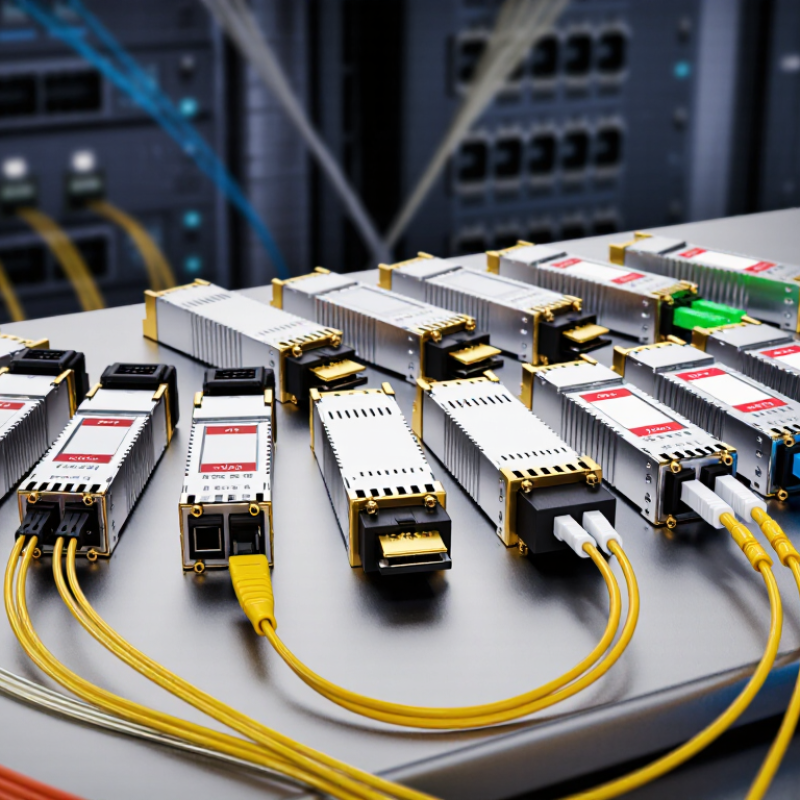
What Are the Top 10 100G QSFP28 Modules?

Understanding 100G QSFP28 Modules and Their Specifications

100G QSFP28 modules support four 25Gb/s lanes, carrying 100Gb/s over fiber or short copper links. Common options include SR4, eSR4, LR4, CWDM4, PSM4, ER4, ZR4, BiDi, DAC, and AOC. They are not interchangeable. SR4 typically uses multimode fiber and an MPO connector, while LR4 commonly uses single-mode fiber and duplex LC connectors. Reach depends on the module type and cable quality. Check the product specification, not just the label.

Key specifications include reach, wavelength, fiber type, connector, power draw, and operating temperature. Also confirm that the switch supports the module’s data rate and coding requirements. A link may fit physically yet fail to establish correctly. Real-world results can vary with patch panels, dirty connectors, and fiber condition; these details are easy to overlook.

Tips: Clean connectors before testing. Verify fiber polarity and cable type, then check the device’s compatibility list. For a short rack connection, compare DAC and AOC options; for longer runs, match the optical module to the installed fiber. When uncertain, test the complete link before deployment.

Top 10 100G QSFP28 Module Types by Maximum Reach

The chart compares nominal maximum link reach in meters. Multimode SR reaches assume OM4 fiber; single-mode reaches assume the specified single-mode fiber. Actual reach depends on fiber, link design, and the applicable standard or MSA specification.

Comparing Module Types by Transmission Distance and Fiber

A 100G QSFP28 choice depends on reach, fiber, and connector layout. SR4 uses parallel multimode fiber with an MPO connector, reaching about 70 meters on OM3 or 100 meters on OM4. eSR4 extends that reach to roughly 300 meters on OM3 and 400 meters on OM4. Both suit short links inside data centers, but their multiple fiber strands require careful polarity checks.

For duplex multimode cabling, SR-BiDi and SWDM4 can use LC connectors; typical reach is up to 100 meters on OM4, though specifications vary. PSM4 reaches about 500 meters over single-mode fiber, using MPO connectors and parallel strands. CWDM4 supports roughly 2 kilometers on single-mode fiber with duplex LC. FR offers a similar 2-kilometer reach, while DR typically reaches 500 meters over single-mode fiber. Check the exact module specification before ordering.

LR4 carries 100G over duplex single-mode fiber for links up to 10 kilometers. ER4 extends that reach to about 40 kilometers, where link budgets and optical power become more critical. Measure twice. Distance figures assume compatible fiber and a properly installed link; dirty end faces, bends, and patch panels can reduce performance. A small oversight matters. I would verify the connector path and fiber grade at both ends, since labels alone do not reveal every installation detail.

The Top 10 100G QSFP28 Modules and Their Key Features

100G QSFP28 modules differ in reach, fiber type, and optical design. SR4 uses parallel multimode fiber and an MPO connector for short data-center links. eSR4 extends that multimode reach, though actual distance depends on the installed fiber.

PSM4 sends four lanes across single-mode fiber, while CWDM4 combines four wavelengths over duplex single-mode fiber. LR4 also uses wavelength multiplexing and typically serves longer duplex-fiber links. ER4 is designed for extended reach, with higher optical budgets to consider.

DR supports a single-lambda, single-mode link over relatively short distances. The 4WDM-10, 4WDM-20, and 4WDM-40 options target approximate reaches of 10, 20, and 40 kilometers, respectively.

Distance matters.

A label alone cannot guarantee a smooth upgrade. Check connector type, fiber plant, link budget, host compatibility, and digital diagnostics before ordering. On a real rack, a mismatched MPO polarity can stop an otherwise sound link.

Still, a neat specification sheet can mislead: reach claims depend on loss, splices, and deployment conditions.

Small details count.

I would verify the exact interface and test the path, rather than choose by reach alone.

Choosing a Module for Network Requirements and Compatibility

What Are the Top 10 100G QSFP28 Modules?

Choosing a Module for Network Requirements and Compatibility

Choosing a 100G QSFP28 module starts with the link, not the product list. Short rack connections may use passive DAC for low power and cost. For longer runs, select an optical type based on distance and installed fiber. SR4 typically uses parallel multimode fiber, while LR4 supports longer single-mode links. CWDM4 and PSM4 suit different fiber layouts, so check connector type and strand count. Actual reach depends on module specifications and link conditions.

Compatibility needs equal attention. Confirm that the switch port supports the module type, lane rate, wavelength, and required FEC setting. Check whether the host requires particular encoding or digital diagnostics. A module that fits physically may still fail to initialize. Test one link before ordering at scale. Record the switch model, software version, fiber type, and measured path length. These details make troubleshooting less guessy.

Tips: Match both ends of the link, then inspect the fiber path and connectors. Clean connectors before testing. Fit is not enough. A detail like an unsupported FEC mode can leave a port dark. Leave some margin for patch panels and aging optics; paper calculations are not the whole story.

Installation and Maintenance Considerations for QSFP28 Modules

Before installing a 100G QSFP28 module, confirm that the switch port supports its interface type, reach, and fiber standard. A module that fits physically may still fail to link. Check the host device’s compatibility guidance and port speed settings; this small check can prevent frustrating troubleshooting later. Use an ESD-safe work area, and keep dust caps on until connections are ready. Clean hands help, but they are not enough.

Align the module with the cage and insert it gently until the latch engages. Never force it. For fiber connections, match the connector type and polarity, then inspect and clean both end faces with tools made for optical connectors. Even a tiny particle can raise signal loss or cause an intermittent link. Respect the cable’s minimum bend radius, and leave enough slack for rack movement without letting fibers block airflow.

After link-up, verify optical levels, temperature, and error counters through the device’s monitoring tools. Record normal readings. They make later changes easier to spot. If a link drops, check alarms, cabling, and port configuration before reseating the module. Repeated cleaning can scratch an end face, so more cleaning is not always better. Replace suspect cables or modules methodically, changing one item at a time.

FAQS

What does a 100G QSFP28 module do?

It carries 100Gb/s using four 25Gb/s lanes over fiber or short copper links.

How far can SR4 reach?

SR4 typically reaches 70 meters on OM3 or 100 meters on OM4 multimode fiber. It uses an MPO connector.

Which module suits a longer single-mode link?

LR4 can reach up to 10 kilometers over duplex single-mode fiber with LC connectors. Check the exact specifications.

How do SR4 and eSR4 differ?

eSR4 extends multimode reach to about 300 meters on OM3 or 400 meters on OM4. Distance matters.

What should I check before ordering a module?

Match reach, fiber type, connector, wavelength, power draw, and temperature range. Confirm host compatibility, too.

Why might a link fail even when the module fits?

The host may not support its data rate or coding. Dirty connectors or incorrect fiber polarity can also cause trouble.

Are DAC and AOC options suitable for short connections?

They are worth comparing for short rack links. Check the device specifications and connection needs.

How can I test a fiber link properly?

Clean the end faces, verify cable type and polarity, then test the complete path. I might still overlook a patch-panel detail.

Conclusion

This article explains how 100G QSFP28 modules support high-speed network connections and what specifications matter when selecting one. It compares common module types by transmission distance, optical design, and fiber requirements, showing why a solution suited to a short data-center link may not fit a longer connection. A concise overview of ten module categories highlights their typical uses and distinguishing features, helping readers understand the trade-offs between reach, cabling, and deployment needs.

To choose the right module, consider the required link distance, existing fiber infrastructure, equipment compatibility, and network operating conditions. The article also covers practical installation and maintenance considerations, such as handling optical components carefully, keeping connectors clean, and verifying that the module is supported by the host device. Together, these points provide a clear, practical framework for matching a 100G QSFP28 module to a network’s requirements.

Mason

Mason

Mason is a seasoned marketing professional with a deep expertise in the company's offerings and a passion for driving brand awareness. With a strong background in digital marketing strategies, he has an innate ability to connect with diverse audiences and effectively communicate product benefits.......